Here are comprehensive and easy-to-learn notes for Chapter 1: Emerging Trends (Web Application Code 803, Class XII). These notes are simplified to help you prepare effectively for your board exams.
Chapter 1: Emerging Trends
This chapter introduces modern technologies that are changing how we live and work.
1.1 Internet of Things (IoT)
What is IoT?
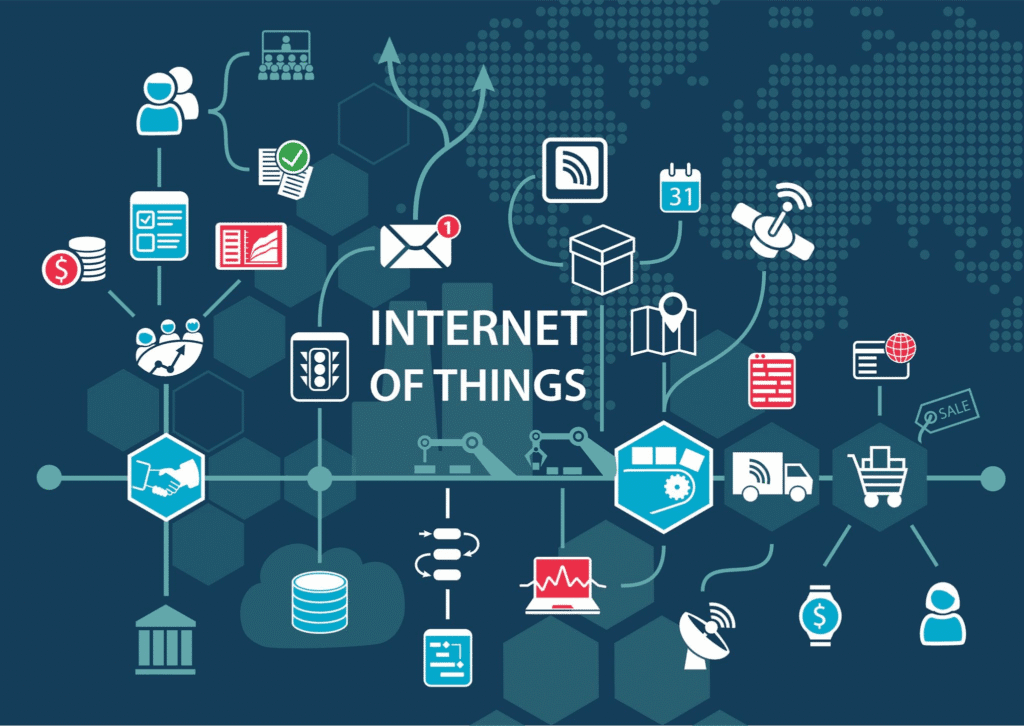
Imagine if your fridge could tell your phone that you are out of milk. That is IoT. It refers to everyday objects (“things”) embedded with sensors and software that connect to the internet to collect and exchange data.
- Key Idea: Connecting physical devices to the digital world.
- Examples: Smartwatches, Smart Bulbs, Driverless Cars, Smart Refrigerators.
Industrial Internet of Things (IIoT)
- This is IoT used in factories and industries.
- Purpose: To monitor machines, predict when they will break, and improve efficiency.
- Difference:
- IoT is for consumers (Smart Home, Wearables).
- IIoT is for industries (Manufacturing, Energy).
Advantages & Disadvantages of IoT
- Pros: Saves money, automates tasks, helps make better decisions.
- Cons: Security risks (hacking), privacy issues, job loss due to automation.
1.2 Types of Operating Systems (OS)
What is an OS?
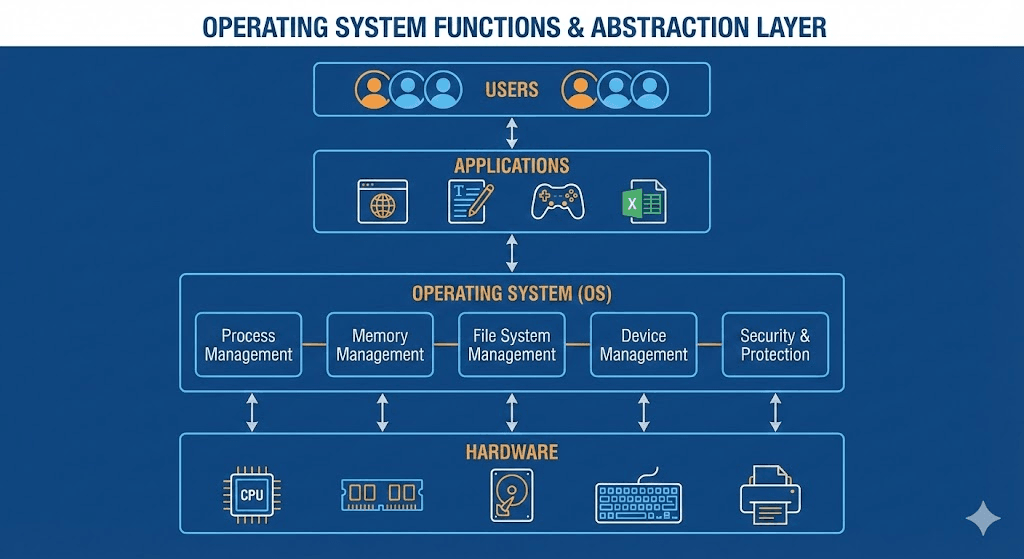
It is the bridge (interface) between you (the user) and the computer hardware. Without an OS, a computer is just a box of parts.
Main Functions of an OS:
- Memory Management: Decides how much memory each app gets.
- Processor Management: Decides which task the CPU should do first.
- Device Management: Controls keyboard, mouse, printer, etc.
- File Management: Saves, deletes, and organizes files.
- Security: Protects data with passwords and access rights.
Types & Examples
- Desktop OS: Windows, MacOS, GNU/Linux.
- Mobile OS: Android, iOS (Designed to be lightweight for phones).
System Software vs. Application Software
- System Software: Runs the computer (e.g., Windows, Android). You need it.
- Application Software: For specific tasks (e.g., MS Word, Games). You install it if you want it.
1.3 Cloud Computing & Edge Computing
A. Cloud Computing
What is it?
Instead of storing files on your own hard drive, you store them on the internet (“The Cloud”). You can access them from anywhere.
Popular Providers:
- Google Drive: Offers 15GB free storage.
- Dropbox: Known for easy file syncing.
- OneDrive: Microsoft’s service, integrates with MS Office.
- iCloud: Apple’s service for iPhones/Macs.
Benefits:
- Cost: Pay only for what you use.
- Access: Access data from any device, anywhere.
- Speed: Easy to test new ideas quickly.
Limitations: Requires internet connection; risk of vendor lock-in (hard to switch providers).
B. Edge Computing
What is it?
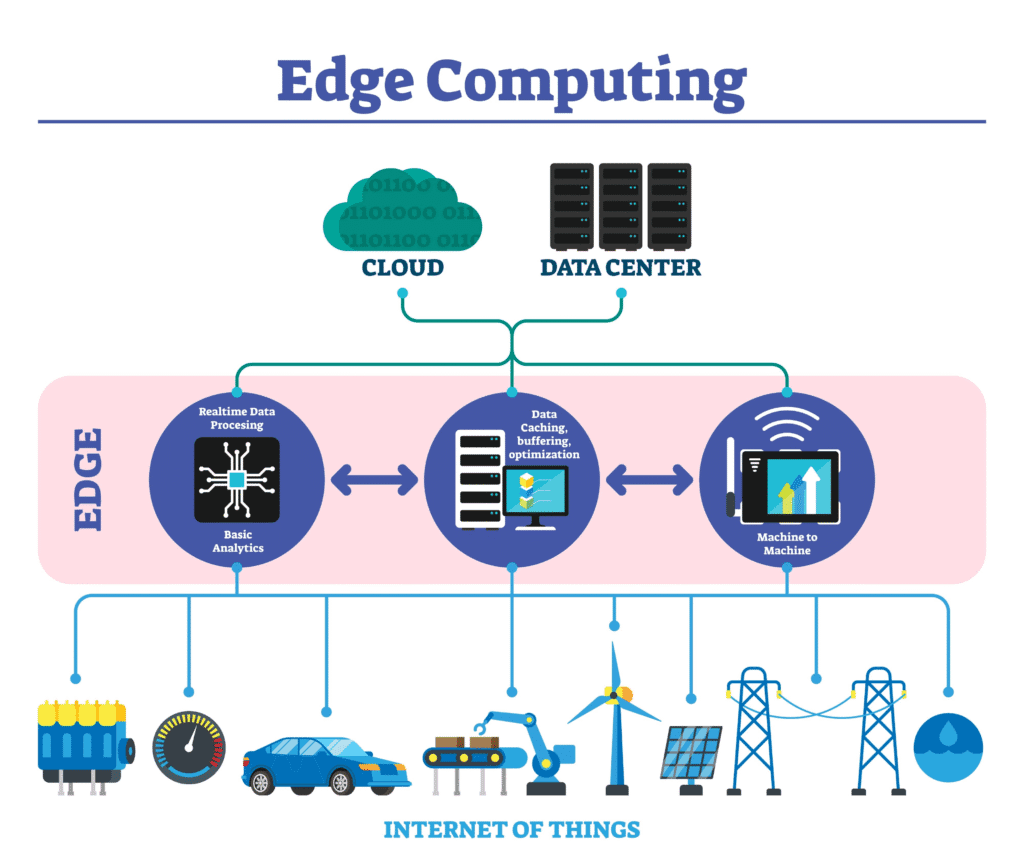
Processing data physically close to where it is created (like on the device itself) rather than sending it all the way to a distant Cloud server.
- Why use it? It is faster (low latency). Ideal for things that need instant reaction, like self-driving cars.
- Difference: Cloud processes data in a central warehouse; Edge processes data locally.
1.4 Artificial Intelligence (AI) & Machine Learning (ML)
Artificial Intelligence (AI)
- Definition: Making a machine think and behave like a human (solving problems, making decisions).
- Examples: Google Maps, Face Recognition, Autocorrect.
Machine Learning (ML)
- Definition: A subset of AI where machines learn from data automatically without being explicitly programmed for every rule.
- Example: Netflix recommending movies based on what you watched before.
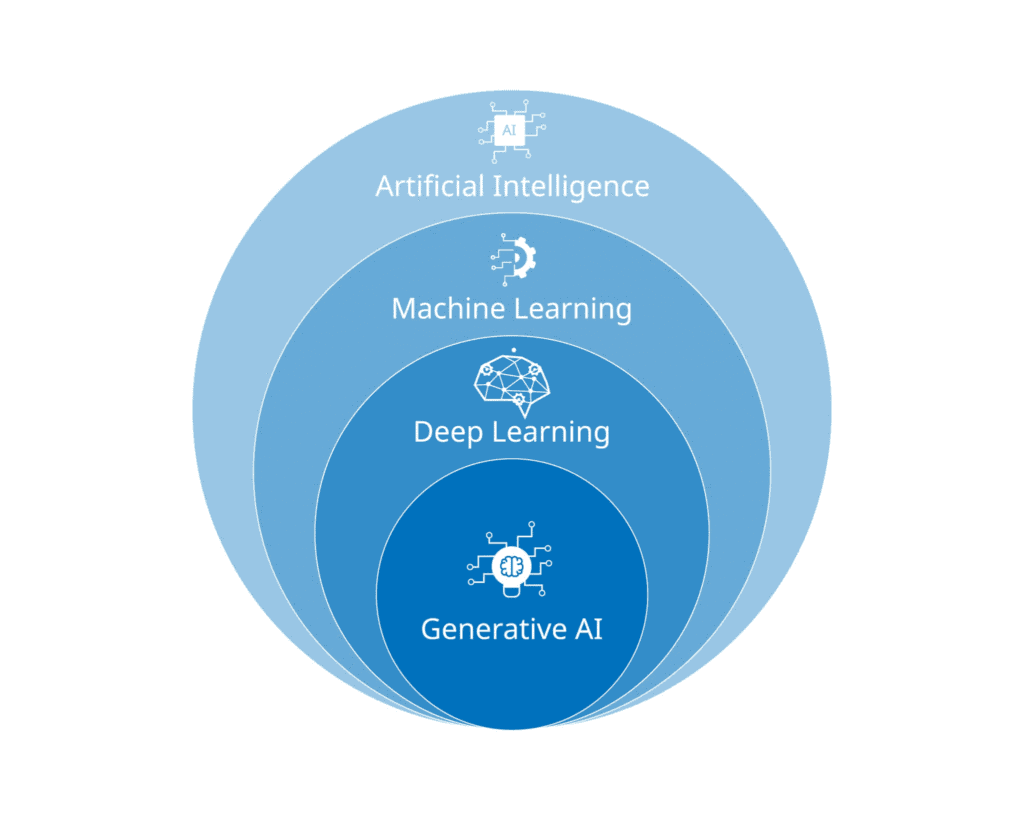
Key Differences:
- AI Goal: To simulate human behavior and solve complex problems.
- ML Goal: To learn from patterns in data to give accurate results.
1.5 Digital Marketing
What is it?
Promoting products using the internet (Social media, Email, Search Engines) instead of traditional TV or newspapers.
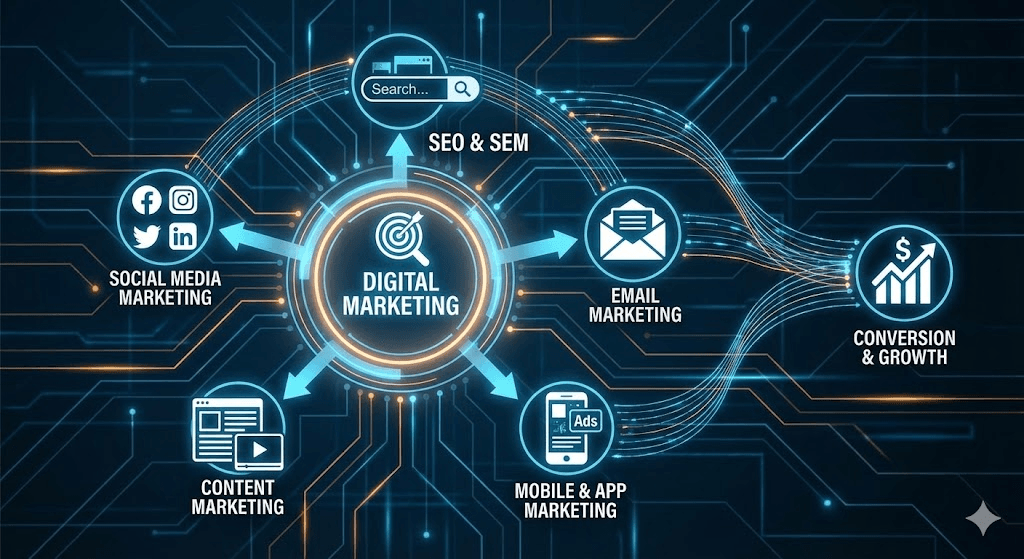
Benefits:
- Global Reach: Sell to anyone in the world.
- Cost-Effective: Often cheaper than TV ads.
- Targeted: Show ads only to people interested in your product.
Career Options:
- Digital Marketing Intern
- SEO Specialist (makes websites show up on Google)
- Social Media Specialist
- Content Writer / Copywriter.
1.6 Social Media Etiquettes
“Etiquette” means good manners. Social media etiquette is how to behave online to stay safe and respectful.
Important Rules for Students:
- Protect Privacy: Never share your home address, phone number, or passwords.
- Don’t Talk to Strangers: Only accept requests from people you know in real life.
- No Cyberbullying: Never tease, harass, or spread rumors about others. It is hurtful and illegal.
- Think Before You Post: Once you post something, it is there forever. If it is rude, don’t post it.
- Stop Rumors: Social media spreads fake news fast. Do not forward messages if you aren’t sure they are true.
- 👉 Ch 1. Emerging Trends: << 50+ Important Multiple Choice Questions >>
- 👉 Ch 1. Emerging Trends: << 50+ Important Question Answer >>
- 👉 Ch 1. Emerging Trends: << NCERT Book Exercise Solution >>
- 👉 Class 12 Web Application Code 803: << Study Material >>
Frequently Asked Questions (FAQs)
These FAQs are based on the textbook chapter. Practicing these will directly help with your Board Exam.
Multiple Choice Questions (MCQs)
1. Who coined the term “Internet of Things” (IoT) in 1999?
a) Steve Jobs
b) Kevin Ashton
c) Bill Gates
d) Mark Zuckerberg
2. Which of the following is an example of the Industrial Internet of Things (IIoT)?
a) A smart refrigerator ordering milk
b) A Fitbit tracking your steps
c) A factory sensor predicting machine failure
d) A smart speaker playing music
3. Which function of the Operating System decides which task the CPU should process first?
a) File Management
b) Memory Management
c) Processor Management (Scheduling)
d) Device Management
4. Which of the following is NOT a Cloud Storage provider?
a) Google Drive
b) Dropbox
c) MS Word
d) OneDrive
5. What is the main advantage of Edge Computing over Cloud Computing?
a) It offers unlimited storage
b) It is slower but cheaper
c) It processes data locally, offering faster response (low latency)
d) It requires no hardware
6. “Predicting what movie you will like based on your watching history” is an example of:
a) Artificial Intelligence
b) Machine Learning
c) Cloud Computing
d) Edge Computing
7. Which of the following is a “System Software”?
a) Microsoft Excel
b) Candy Crush
c) Android
d) Adobe Photoshop
8. In Digital Marketing, “SEO” stands for:
a) Search Engine Operation
b) Search Engine Optimization
c) System Engine Organization
d) Social Engagement Online
9. Which of the following is considered bad social media etiquette?
a) Asking permission before tagging a friend
b) Sharing a verified news article
c) Posting your home address and phone number publicly
d) Reporting a bully
10. What is the primary risk associated with IoT devices?
a) They are too heavy
b) They consume too much paper
c) Security and Privacy hacking risks
d) They cannot connect to electricity
11. The process of storing data on the internet rather than on a local hard drive is called:
a) Edge Computing
b) Grid Computing
c) Cloud Computing
d) Physical Computing
12. Which of these is an example of a Mobile Operating System?
a) Windows 10
b) iOS
c) Linux
d) Unix
13. A machine that can simulate human thinking and behavior is known as:
a) A Calculator
b) Artificial Intelligence (AI)
c) A Hard Drive
d) A Router
14. If you receive a friend request from a stranger on Facebook, what is the safest action?
a) Accept it immediately
b) Share your phone number with them
c) Decline or ignore the request
d) Ask them for money
15. Digital Marketing allows brands to:
a) Only sell products locally
b) Spend more money than TV ads
c) Target specific audiences globally
d) Stop using the internet
Question Answer
Q1: What is the main difference between IoT and IIoT?
Answer:
- IoT (Internet of Things): Connects consumer devices like smartwatches, fridges, and home assistants to the internet for convenience.
- IIoT (Industrial Internet of Things): Connects industrial machines and sensors in factories to monitor production, predict machine failures, and improve efficiency.
Q2: What are the advantages and disadvantages of Cloud Computing?
Answer:
- Advantages:
- Cost-effective: No need to buy expensive servers/hard drives.
- Accessibility: Access files from anywhere, anytime.
- Backup: Data is safe even if your device breaks.
- Disadvantages:
- Internet Dependent: Cannot access files without an internet connection.
- Security: Risk of data theft from the cloud provider’s server.
- Vendor Lock-in: Difficult to switch service providers later.
Q3: Explain the 4 main functions of an Operating System.
Answer:
- Memory Management: Allocates RAM to different programs and frees it up when not in use.
- Processor Management: Decides which task the CPU should process first (scheduling).
- Device Management: Controls hardware like printers and keyboards using drivers.
- File Management: Organizes, saves, deletes, and retrieves files and folders.
Q4: Why is Edge Computing faster than Cloud Computing?
Answer: Edge computing processes data locally (on the device or nearby) rather than sending it to a distant server. This reduces “latency” (delay), making it faster and ideal for real-time tasks like self-driving cars.
Q5: What are some social media etiquettes a student must follow?
Answer:
- No Cyberbullying: Never post hurtful comments or harass others.
- Verify before Sharing: Do not spread fake news or rumors.
- Respect Privacy: Do not share others’ photos without permission or post personal details (address/phone number) publicly.
- Think before Posting: Remember that digital footprints are permanent.
Q6: (Case Study) Komal shared personal info on Facebook and was stalked. What etiquette did she miss?
Answer:
- Mistake: She shared too much personal information (address/location) with a “friend” she barely knew or met online.
- Action Required: She should report the user to the platform, block them immediately, and inform her parents or the cyber cell. Ideally, one should strictly limit who can see their personal details (Privacy Settings).
Q7: What career opportunities exist in Digital Marketing?
Answer: You can work as a:
- Digital Marketing Manager
- SEO Specialist (Search Engine Optimization)
- Social Media Manager
- Content Writer/Copywriter
- Email Marketing Specialist
#Class12 #WebApplication803 #CBSEBoardExam #EmergingTrends #StudyNotes #IoT #ArtificialIntelligence #CloudComputing #Education #CBSE2025