Graphic Designing using Canva and Adobe Express Class 12 Web Application Code 803 NCERT Book Solution

Book Exercise with Answer
I. Multiple Choice Questions:
1. The process of transforming any idea or content into a visually appealing, eye-catching form is:
a. Event management
b. Product Designing
c. Content Management
d. Graphic Designing
Ans: d. Graphic Designing
2. The following is a free product for schools and other educational institutions intended to facilitate collaboration between students and teachers:
a. Canva School Domain
b. Canva Magic Write
c. Canva for Education
d. Canva Assistant for Schools
Ans: c. Canva for Education
3. On January 11, 2024, Canva launched its own GPT in OpenAI’s GPT Store which is
a. Magical AI
b. Magic Studio
c. Canva Magic Assistant
d. My Studio
Ans: b) Magic Studio
4. Which of the following is not true for Canva:
i) It is easy to use
ii) Cannot work in Canva without a license
iii) It is Versatile
iv) Your work will not be saved automatically
a. i), ii) and iii)
b. i) and iii)
c. ii) and iv)
d. All of these
Ans: c) ii) and iv)
5. Why should we use High-Quality Images in Canva?
a. Helps create professional-looking designs.
b. The high-quality images do not get pixelated on magnification.
c. Canva provides a range of stock images that can be used for free or purchased.
d. All of the above.
Ans: d) All of the above
6. In which part of the Canva editor window does a small toolbar appear when you click on an element?
a. Header
b. Footer
c. Object Panel
d. Floating Toolbar
Ans: d) Floating Toolbar
7. File, Save, Share, and Design Name are parts of __ in the Canva Editor Window
a. Header
b. Footer
c. Object Panel
d. Floating Toolbar
Ans: a) Header
8. ______ in Object Panel allows you to upload your own elements such as images, videos, audios and graphics and save them in Canva.
a. Apps
b. Uploads
c. Files
d. Projects
Ans: b) Uploads
9. In Canva the _____ toolbar becomes visible whenever you choose video in the design.
a. Floating
b. Design
c. Video
d. Text
Ans: c) Video
10. Presenter notes, Zoom, Full Screen, and Grid are available in which part of the Canva Editor Window?
a. Header
b. Footer
c. Object Panel
d. Floating Toolbar
Ans: b) Footer
11. In Canva, which toolbar comes up automatically when you choose text in the design?
a. Text Toolbar
b. Design Toolbar
c. Photo Toolbar
d. Video Toolbar
Ans: a) Text Toolbar
12. In Canva, ______ option in the floating toolbar moves elements backwards, forward, to the front, to the back.
a. Lock
b. Animate
c. Layer
d. Move
Ans: c) Layer
13. Which option in the floating toolbar of Canva can be used for collaborators to see or for later reference?
a. Post
b. Comment
c. Alternative Text
d. Info
Ans: b) Comment
14. Which of the following statements is not true for splitting a video?
a. We can split a video into two parts each time.
b. We can split a video several times.
c. After splitting a video, we can add a transition between the two parts.
d. Splitting can only be done from the beginning and end of a video.
Ans: d) Splitting can only be done from the beginning and end of a video
15. More Formal, More Fun, Rewrite, Summarize etc. are alternatives for which tool in Canva
a. Magic Edit
b. Magic Grab
c. Magic Write
d. Magic Media
Ans: c) Magic Write
16. In Canva, all designs, images, files, favorites, purchases, items shared with you, and folders are available in ____ in the Object Panel
a. Apps
b. Uploads
c. Files
d. Projects
Ans: d) Projects
17. We can share our design by clicking the ______ button in the Header.
a. Link
b. Collaborate
c. Share
d. Save
Ans: c) Share
18. ____ uses AI technology to find the beats in a song.
a. Beat Sync
b. Audio Effects
c. Adjust
d. Magic Beats
Ans: a) Beat Sync
19. In Canva, each premium music purchase is for one-time use, which means
a. You can use the track once only.
b. You can only use the track in one design.
c. You can only use the track once in any design created in your Canva account.
d. None of these.
Ans: b) You can only use the track in one design
20. In Canva you can turn text to video or images in ______.
a. Magic Grab
b. Magic Write
c. Magic Media
d. Magic Morph
Ans: c) Magic Media
21. In Adobe Express, we can generate extraordinary text effects and images instantly from just a description with ______.
a. Adobe Firefly generative AI
b. Adobe Spark generative AI
c. Creative Cloud Express AI
d. Adobe AI Express
Ans: a) Adobe Firefly generative AI
22. The minimum memory requirements for creating content using Adobe Express is ______.
a. 10 GB
b. 12 GB
c. 4GB
d. No minimum requirement
Ans: c) 4 GB
23. In Adobe Express from the Left panel, select _____ to add Photos or Videos.
a. Library
b. Media
c. Frames
d. Images
Ans: b) Media
24. _____ in the Left Panel brings the third-party app designs into your design.
a. Add-ins
b. Apps On
c. Add-ons
d. App Design
Ans: c) Add-ons
25. In Adobe Express use the _____ to select the image or video you want to replace in a template, then select Replace.
a. Layers panel
b. Template Panel
c. Style Panel
d. Image Pane
Ans: a) Layers panel
II. State True and False for the following statement:
1. Canva requires special software installation on your PC to be able to work.
Ans: False
2. You can sign up for free in Canva.
Ans: True
3. Only templates can be used for graphic designing in Canva.
Ans: False
4. Templates are only available for videos.
Ans: False
5. In its first year, Canva had more than 750,000 users.
Ans: True
6. Canva Magic Read, is the platform’s AI-powered copywriting assistant.
Ans: False
7. You can use the tools for freehand drawing, underlining, highlighting, and erasing.
Ans: True
8. Elements option in the Object Panel in Canva can be used to select photos, frames, shapes, lines, backgrounds, etc. to add to your design.
Ans: True
9. Canva does not allow multiple users to collaborate on a single design.
Ans: False
10. Once you trim a video, the trimmed part is hidden and not deleted.
Ans: True
Web Application 803 Exercise Answers
III. Answer the following questions.
1. What is Graphic Designing?
Ans: Graphic designing is the process of creating visual content using images, text, colours, and layouts to communicate ideas or information effectively.
2. Give any four areas where Graphic designing is used.
Ans: Areas where Graphic Designing:
- Advertising and marketing
- Social media posts
- Posters and banners
- Website and app design
- Logos and branding
IV. Answer the following questions based on Canva.
1. Write any 3 advantages of Canva.
Ans: Three advantages of Canva
- Cloud-based (auto saves designs)
- Easy to use interface
- Large collection of templates and elements
- Allows collaboration and sharing
2. Why should customize design elements even if we are using a template?
Ans: Customizing elements helps make the design unique, more relevant to the topic, and suited to the user’s requirements.
3. How can we use Canva effectively?
Ans: Canva can be use effectively by-
- Keep designs simple and readable
- Use high-quality images
- Choose suitable templates
- Maintain colour and font consistency
4. How is your design saved in Canva?
Ans: Designs are automatically saved in the cloud in Canva under Projects.
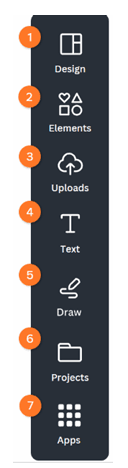
5. Explain the usage of Elements, Uploads and Apps in Canva’s Object panel.
Ans: Elements: Used to add shapes, icons, lines, frames, stickers, charts and graphics.
Uploads: Used to upload personal files such as images, videos, and audio.
Apps: Used to integrate third-party tools and additional Canva features.
6. Briefly describe the main parts of the Canva editor window.
Ans: Main parts of Canva Editor Window
- Header – Contains File, Share, Design name etc.
- Object Panel – Contains templates, elements, uploads, text etc.
- Editing Area / Canvas – Where the design is created.
- Floating Toolbar – Appears when an element is selected.
- Footer – Contains zoom, grid view, presenter notes etc.
7. What is a floating toolbar in Canva?
Ans: A floating toolbar appears when an element (text, image, video etc.) is selected. It contains options to edit that element such as colour, alignment, animation etc.
8. Write the steps to split, cut, and trim a video.
Ans: Steps to Split, Cut and Trim a Video
- Select the video in the timeline.
- Move the playhead to the desired position.
- Click Split to divide the video.
- Select unwanted part and delete it (cut).
- Drag the edges of the clip to adjust length (trim).
9. What is the difference between splitting, cutting and trimming a video?
Ans: Difference between Splitting, Cutting and Trimming
| Feature | Meaning |
|---|
| Split | Divides a video into two parts |
| Cut | Removes a portion of the video |
| Trim | Shortens the beginning or end of a video |
10. Write the steps to add a transition effect between two slides in a presentation.
Ans: Steps to add transition between slides
- Select the space between two slides.
- Click Add Transition.
- Choose transition type.
- Adjust duration and apply.
11. Write the steps for animating elements in a presentation.
Ans: Steps to animate elements
- Select the element.
- Click Animate from toolbar.
- Choose animation style.
- Apply to element or page.
12. Write the steps to share a design in Canva.
Ans: Steps to share a design
- Click Share button in the header.
- Enter email or copy link.
- Choose permission (view/edit/comment).
- Send or share link.
13. Write the steps to download a design in Canva.
Ans: Steps to download a design
- Click Share.
- Select Download.
- Choose format (PNG, JPG, PDF, MP4 etc.).
- Click Download.
14. How can you add audio tracks to a video?
Ans: To add audio tracks to a video
- Open Apps / Audio section.
- Search for music.
- Drag the audio track to the timeline.
- Adjust duration and volume.
15. By clicking the “ellipsis” menu, we get a menu with many options for audio tracks, briefly describe these options.
Ans: Options available in ellipsis menu for audio
- Trim audio
- Adjust volume
- Fade in / Fade out
- Replace audio
- Delete audio
16. What is Beat Sync?
Ans: Beat Sync is an AI feature that automatically synchronizes video clips with the rhythm of the music track.
17. Name any 5 AI tools in Magic Studio. Are these free for all users?
Ans: Five AI tools in Magic Studio
- Magic Write
- Magic Media
- Magic Edit
- Magic Grab
- Magic Morph
18. What is the use of Magic Write?
Ans: Magic Write is an AI-powered writing assistant used to generate, rewrite, summarize or expand text content.
V. Label the following Toolbars in Canva.
i) Header

1. File, 2. Resize, 3. Undo, Redo, 4. Save All Changes 5. Design Name 6. Share, 7. Analytics 8. Share
ii) Object Panel; Left side panel containing tools and elements.
iii) Footer: Bottom area with zoom and presentation controls.

iv) Text Toolbar: Appears when text is selected.

v) Video Toolbar: Appears when video is selected.

VI. Using Canva do the following practically and write the steps for each.
i. A poster for “Animal Protection Against Cruelty” using a template
ii. A presentation about “The National Education Policy” using a blank presentation
iii. A video about “Indian Startups” using a template and also generate an audio track using AI.
Graphic Designing Using Canva and Adobe Express
VII. Answer the following questions based on Adobe Express
1. What are the advantages of Adobe Express?
Ans: Advantages of Adobe Express
- Integration with Adobe Creative Cloud
- Easy graphic and video creation
- AI tools with Adobe Firefly
- Large template library
- Cloud storage
2. What is Adobe Express for Education?
Ans: Adobe Express for Education is a version designed for teachers and students, offering tools for creating projects, presentations, posters and videos in a collaborative environment.
3. Explain the usage of the following in the Left Panel:
a. Templates
b. Media
c. Elements
d. Grids
e. Add-ons
Ans: Usage of following elements are
a. Templates: To select ready-made designs.
b. Media: To Add photos or videos.
c. Elements: To insert different elements like Shapes, icons and graphics.
d. Grids: Layouts for arranging images.
e. Add-ons: Third-party apps integrated with Adobe Express.
4. Write the steps to:
a. Split a video in Adobe Express.
b. Delete part of a video in Adobe Express.
c. Trim a video in Adobe Express.
Ans:
a. Split a video in Adobe Express.
- Select video clip.
- Move playhead to required position.
- Click Split.
b. Delete part of a video in Adobe Express.
- Split video at start and end of unwanted part.
- Select unwanted section.
- Click Delete.
c. Trim a video in Adobe Express.
- Select video clip.
- Drag the start or end handles.
- Adjust duration.
VIII. Do the following in Adobe Express and write the steps accordingly.
1. Create a Poster for “Environment Day” using a template. Customize it using different theme colours, fonts and images.
2. Create a 1–2-minute video(like an advertisement) without using a template to introduce a new brand of school uniforms. Create a logo for your company and add theme colours, fonts, images and audio.
IX. Competency Based Questions
1. You are in the school annual day committee and have been made in charge of designing the invitation cards on an urgent basis. What is the best way to do this while sharing the designs with your teachers?
Ans: Designing invitation cards for Annual Day
Use Canva templates to quickly create invitation cards and share them with teachers using the Share link or collaboration feature for editing and feedback.
2. Your cousin is getting married and he wants to send an original save the date video to the family and friends through a link, how can you help him?
Ans: Save the date wedding video
Create a video template in Canva or Adobe Express, add photos, text and music, export as video and share using a public link or downloadable file.
Class 12 Web Application Code 803 Unit 3 Solutions