
Student Record Management System – Java & MySQL Project
Project Overview
The Student Record Management System is a Java Swing and MySQL–based application designed to manage student academic records in a digital and efficient manner. This project replaces manual record keeping with a secure database-driven system that allows easy storage, retrieval, and modification of student information.
Problem Statement
Managing student records manually is time-consuming and prone to errors. Searching, updating, and maintaining large volumes of data becomes difficult without a computerized system. This project aims to solve these issues by using a relational database with a user-friendly Java GUI.
Objectives of the Project
- To store student academic records securely in a database
- To implement CRUD operations using Java and MySQL
- To display student records in tabular form using JTable
- To provide fast and accurate search functionality
Tools & Technologies Used
- Programming Language: Java
- GUI Framework: Java Swing
- Database: MySQL
- Connectivity: JDBC
- IDE: NetBeans / Eclipse
Database Structure (Student Table)
| Field Name | Data Type |
|---|---|
| roll_no | INT (Primary Key) |
| name | VARCHAR(50) |
| class | VARCHAR(20) |
| marks | INT |
Project Workflow
- User enters student details through the GUI form
- Java application connects to MySQL using JDBC
- SQL queries are executed (Insert / Update / Delete / Select)
- Records are stored or retrieved from the database
- All student data is displayed in a JTable
Key Features
- Add new student records
- Update existing student details
- Delete student records
- Search student by roll number
- Display all student records in JTable
- Secure data storage using MySQL
💻 Source Code (Database Connection)
Connection con;
con = DriverManager.getConnection(
    "jdbc:mysql://localhost:3306/studentdb",
    "root",
    "password"
);
💻 Source Code (Add Button)
private void btnAddActionPerformed(java.awt.event.ActionEvent evt) {
        // TODO add your handling code here:
         try {
            Connection con = DBConnection.getConnection();
            PreparedStatement pst = con.prepareStatement(
                "INSERT INTO students VALUES (?,?,?,?)"
            );
            pst.setInt(1, Integer.parseInt(txtRoll.getText()));
            pst.setString(2, txtName.getText());
            pst.setString(3, txtClass.getText());
            pst.setInt(4, Integer.parseInt(txtMarks.getText()));

            pst.executeUpdate();
            JOptionPane.showMessageDialog(this,"Record Added Successfully");
        }
        catch(Exception e){
            JOptionPane.showMessageDialog(this, e.getMessage());
        }
    }
💻 Source Code (Search Button)
private void btnSearhActionPerformed(java.awt.event.ActionEvent evt) {
        // TODO add your handling code here:
        try {
            Connection con = DBConnection.getConnection();
            PreparedStatement pst = con.prepareStatement(
                "SELECT * FROM students WHERE rollno=?"
            );
            pst.setInt(1, Integer.parseInt(txtRoll.getText()));
            ResultSet rs = pst.executeQuery();

            if(rs.next()){
                txtName.setText(rs.getString("name"));
                txtClass.setText(rs.getString("class"));
                txtMarks.setText(rs.getString("marks"));
            }
            else{
                JOptionPane.showMessageDialog(this,"Record Not Found");
            }
        }
        catch(Exception e){
            JOptionPane.showMessageDialog(this, e.getMessage());
        }
    }
📌 Complete source code is available in the download section.
Output Screens
- Student Entry Form
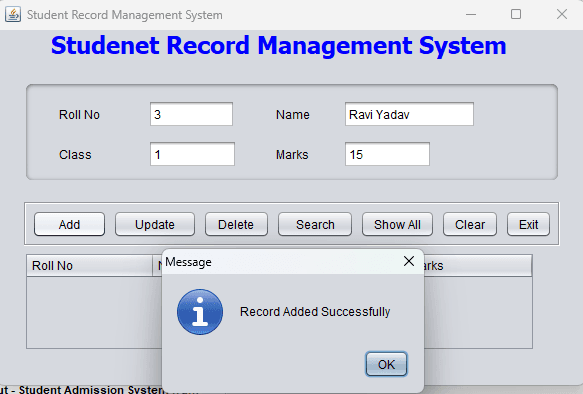
- JTable displaying all student records
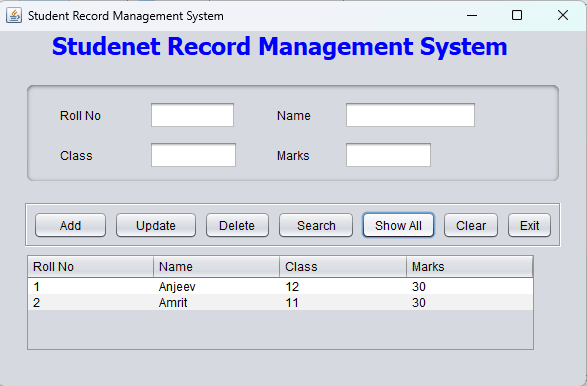
- Search result output
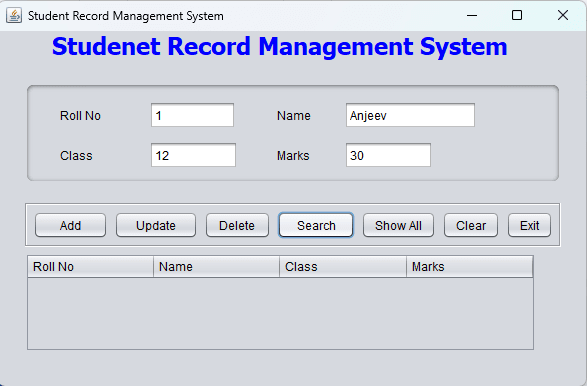
(Screenshots included in the project report)
Download Section
- ✅ Download Complete Source Code (ZIP)
- ✅ Download/Buy Project Report (PDF)
- ✅ Download MySQL Database File
Conclusion
The Student Record Management System demonstrates the practical use of Java Swing and MySQL for real-world data management. This project helps students understand GUI design, database connectivity, and basic CRUD operations, making it ideal for academic and practical learning purposes.
👉 View more Java & MySQL Projects
👉 Download ready-to-use project files
